

Automation Report — Northfield Bookkeeping Co. (fictional)
SAMPLE REPORT · Fictional company · Small bookkeeping and accounting firms · Prepared October 2026
This is a sample report for a fictional company, generated from sample intake answers by the same engine used for real reports. Any resemblance to a real business is coincidental.
Prepared for Sam.
1. Summary
The answer: Let the software do the books first: free up about 44.4 hours a month, room to take on about 6 more clients without hiring (about $27,000 a year in fees).
- Time-leak score: 35/100 (Moderate)
- Time spent on the 6 areas we measured: 151.8 hours per month
- Recoverable with your top 5 fixes: 44.4 hours per month
- Estimated annual value: $22,370 (at your stated $42/hour)
- Start here: Set up automatic reminders for this month's recurring requests.
2. Built for your setup
- Your software: Cloud accounting software (fictional sample) and Client portal (fictional sample). Steps in this report are written for it.
- Your team: Owner/principal, Bookkeeper, Senior accountant, Admin or client coordinator. Every task is assigned to one of these roles.
- Features you told us you have but don't use yet: Bank feeds, Receipt capture, Automatic invoice reminders.
- Your goal: Cut workload so the team isn't stretched.
- In your words: "Sending the same document reminders every month and re-keying receipts."
- Growth capacity: about 6 more clients without hiring, worth about $27,000 a year in fees (estimate).
- Your budget: $100–$500. Paid tools are shown only where they clearly pay back. Bigger fixes: show us how and we'll do it.
3. Your time-leak map
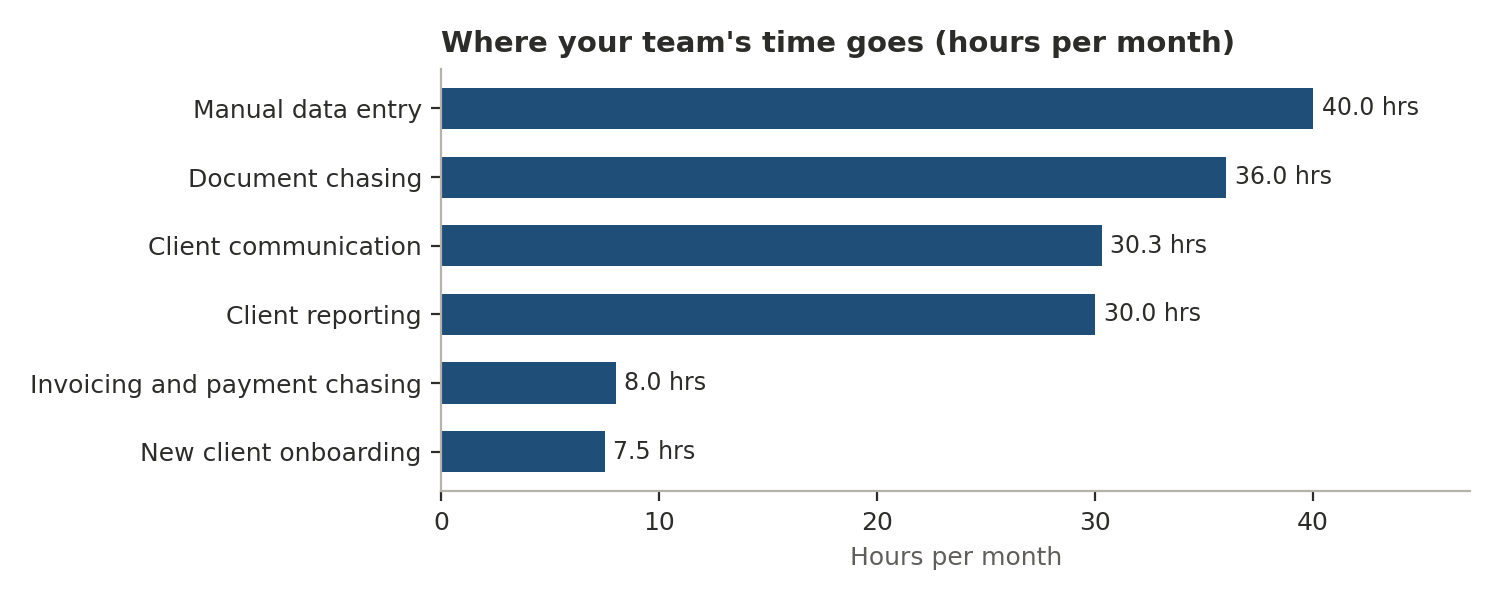
| Area | Hours per month | Share of total |
|---|---|---|
| Manual data entry | 40.0 | 26% |
| Document chasing | 36.0 | 24% |
| Client communication | 30.3 | 20% |
| Client reporting | 30.0 | 20% |
| Invoicing and payment chasing | 8.0 | 5% |
| New client onboarding | 7.5 | 5% |
4. Your top fixes, ranked by annual value
Fix 1: Automated document requests and reminders (one checklist per client) — $6,350 per year
Why: Your team sends about 180 document requests a month, and a typical request needs 2-3 follow-ups across portal and email.
- Create one standard document checklist per client type
- Send requests with automatic reminders until items arrive
- Move remaining email clients onto the portal with a short how-to
Who: Admin or client coordinator · Effort: Low-code setup · Quick win: Set up automatic reminders for this month's recurring requests.
The math: 36.0 hours/month on document chasing × 35% recoverable × $42/hour × 12 months = $6,350 per year (rounded)
Fix 2: Bank feeds and automated receipt capture — $6,050 per year
Why: Only some clients have bank feeds connected, and receipts mostly arrive as emailed photos that are re-keyed.
- Connect bank and card feeds for your highest-volume clients first
- Give clients a receipt-capture option that forwards into your accounting software
- Use bank rules for recurring transactions
Who: Bookkeeper · Effort: Do it yourself · Quick win: Connect feeds for your five busiest clients.
The math: 40.0 hours/month on manual data entry × 30% recoverable × $42/hour × 12 months = $6,050 per year (rounded)
Fix 3: Auto-generated monthly client summaries — $4,540 per year
Why: You prepare about 120 client reports a month at about 15 minutes each.
- Build one standard report template per client type
- Schedule reports to generate from your accounting software
- Add a short standard commentary block
Who: Senior accountant · Effort: Do it yourself · Quick win: Create one reusable monthly report template.
The math: 30.0 hours/month on client reporting × 30% recoverable × $42/hour × 12 months = $4,540 per year (rounded)
Fix 4: Client status visibility and FAQ automation — $3,820 per year
Why: Your team handles about 60 client messages a week, and the same questions keep coming back: status of their books or return, what documents are needed, deadlines.
- Share a simple status view or monthly status email per client
- Publish a short FAQ for your top repeat questions
- Use saved replies that link to the FAQ
Who: Admin or client coordinator · Effort: Low-code setup · Quick win: Send an automatic monthly 'here's where your books stand' email.
The math: 30.3 hours/month on client communication × 25% recoverable × $42/hour × 12 months = $3,820 per year (rounded)
Fix 5: Automated invoicing and payment reminders — $1,610 per year
Why: Payment reminders are sent by hand, and invoicing and chasing payments takes about 8 hours a month.
Good news: you told us Cloud accounting software (fictional sample) can already do this (Automatic invoice reminders), so this may only need switching on.
- Turn on automatic invoice reminders before and after the due date
- Offer online payment on every invoice
- Consider recurring billing for monthly clients
Who: Admin or client coordinator · Effort: Do it yourself · Quick win: Turn on automatic overdue reminders in your invoicing tool.
The math: 8.0 hours/month on invoicing and payment chasing × 40% recoverable × $42/hour × 12 months = $1,610 per year (rounded)
5. Free fixes you can do this week
No code and no new software. Each is assigned to someone on your team.
| Free fix | Who | Why it's on your list |
|---|---|---|
| Set automatic reminders for recurring document requests | Admin or client coordinator | Matches what you told us |
| Connect bank feeds for your five busiest clients | Bookkeeper | Matches what you told us |
| Send one standard document checklist per client type | Admin or client coordinator | Matches what you told us |
| Turn on automatic overdue-invoice reminders | Admin or client coordinator | Recommended for firms like yours |
| Send an automatic monthly status email | Admin or client coordinator | Recommended for firms like yours |
| Create one reusable monthly report template | Senior accountant | Recommended for firms like yours |
| Write a standard welcome email with your document checklist | Admin or client coordinator | Recommended for firms like yours |
6. You may already own this
You told us Cloud accounting software (fictional sample) includes these features, but your team doesn't use them yet:
- Bank feeds
- Receipt capture
- Automatic invoice reminders
You told us you use cloud accounting software and a client portal used by some clients. Many tools in these categories include bank feeds, receipt capture, invoice reminders, scheduled reports, and automated document requests. In a live report, this section names the specific features in your tools, each checked against the vendor's current documentation with the date it was verified.
7. Your 30/60/90-day roadmap
| Timeframe | Focus |
|---|---|
| First 30 days | Bank feeds and automated receipt capture (Bookkeeper); Auto-generated monthly client summaries (Senior accountant) |
| Days 31–60 | Automated invoicing and payment reminders (Admin or client coordinator); Automated document requests and reminders (one checklist per client) (Admin or client coordinator) |
| Days 61–90 | Client status visibility and FAQ automation (Admin or client coordinator) |
8. Cautions before you automate
- Client data: confirm where any new tool stores client financial data, who can access it, and how access is removed when staff leave.
- Bank and app connections: grant the minimum access needed and review connected apps regularly.
- Engagement terms: if automation changes what clients must do, update engagement letters with a qualified professional.
- Timing: schedule bigger changes outside your busiest weeks.
9. Assumptions and inputs
| Input or assumption | Value | Source |
|---|---|---|
| Staff cost per hour | $42 | Your answer |
| About how many document or receipt requests do you send clients per month, including follow-ups | 180 requests per month | Your answer |
| Average minutes of staff time per request, including follow-ups | 12 minutes | Your answer |
| Staff hours per month on manual data entry and transaction categorization | 40 hours per month | Your answer |
| About how many client emails and calls (excluding document requests) does your team handle per week | 60 messages per week | Your answer |
| Average minutes per message or call | 7 minutes | Your answer |
| Staff hours per month on invoicing and chasing payments | 8 hours per month | Your answer |
| How many client reports or summaries do you prepare per month | 120 reports per month | Your answer |
| Average minutes to prepare and send each report | 15 minutes | Your answer |
| About how many new clients do you onboard per year | 15 clients per year | Your answer |
| Staff hours to onboard each new client | 6 hours | Your answer |
| Recoverable share: Automated document requests and reminders (one checklist per client) | 35% | Assumption (conservative placeholder) |
| Recoverable share: Bank feeds and automated receipt capture | 30% | Assumption (conservative placeholder) |
| Recoverable share: Auto-generated monthly client summaries | 30% | Assumption (conservative placeholder) |
| Recoverable share: Client status visibility and FAQ automation | 25% | Assumption (conservative placeholder) |
| Recoverable share: Automated invoicing and payment reminders | 40% | Assumption (conservative placeholder) |
10. Review and disclaimer
Reviewed by: [Reviewer name], [date]. Every report is checked by automated QA and approved by a person before delivery.
Estimates are based on information you provided and the stated assumptions. Results vary. This report covers operations and workflow only and is not accounting, tax, legal, or financial advice.